How iMeetStand works.
iMeetStand is a score reader built for practice, with the people learning the same music a message away. This is what the app does today.
Free for all your Apple devices, from the App Store.

Your music, on the stand.
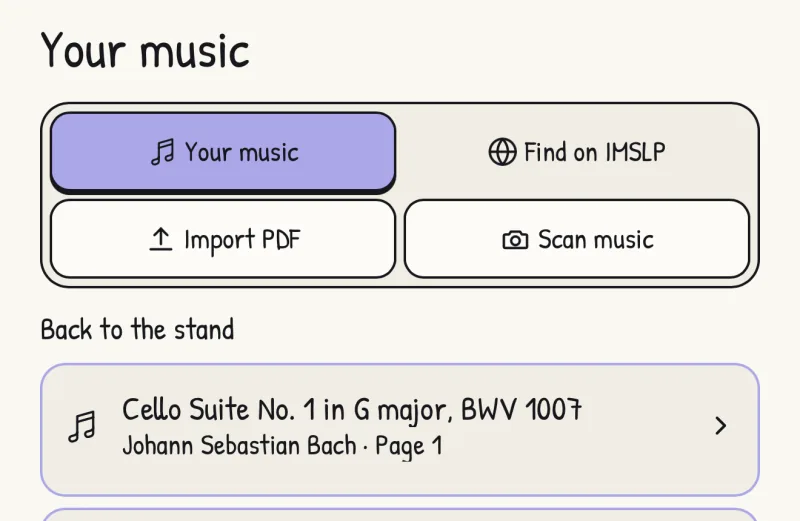
Add the PDFs you already practice from, or search IMSLP inside the app and import a public-domain edition. You can also send a PDF in from another app through the share sheet, or scan paper music with the camera on your iPhone or iPad.
Sign in, and your library follows you to your other devices. It is private: only your own account can open it. Your markings come with it, and nobody else sees them.
- A ballpoint, a pencil, a marker and a highlighter, in any colour, with an eraser and undo
- Stamps for fingerings, bowings, dynamics and articulations
- A tuner and a metronome, in a drawer over the score
- Page turns with a tap at the edge of the page, and pinch to zoom
Ask right on the music.
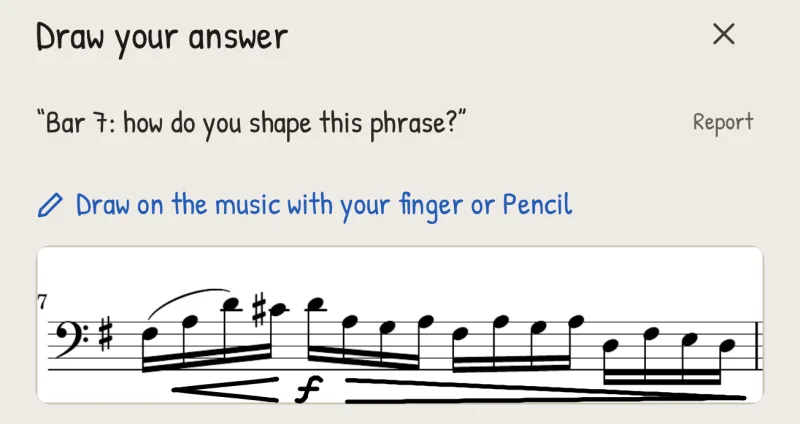
When a passage confuses you, draw a box around it and ask about it in a chat: with a friend, with a group, or with everyone who has the piece. Only the passage you boxed is sent, never the page and never the file.
Whoever answers writes on that passage, by hand, and needs no copy of the piece to do it. When it is easier to show than to write, they can answer with a short video instead. You can put their writing on your own page, in the place you boxed.
Nothing reads your score. The box you drew is how an answer finds its place.
Every piece has a room.
Tell the app which piece a score is, and you can join that piece's chat, called Everyone with this piece, with the other people who have it. Your friends can see when you have a score open, and you can see theirs. It says the score is open, never how anyone is playing.
Make a group for your studio, your section or your quartet, give it a name, and invite your friends to it. You can ask about a passage there too.

A quiet practice clock.
The clock keeps your practice time on your device. Set a goal for the day, the week or the month. Any day with five minutes or more keeps your streak going.
Your time is yours. It is not shown to anyone else.
Film a take. Share it as a reel.
Record the passage you are working on and post it to the feed. Scroll the reels other musicians share, love one with a double tap, and send one to a friend in a message.
A companion that grows when you help.
Your Meetie is a hand-drawn note brought to life, in a colour you choose. It is how other people see you in the app.
It starts as a sixteenth note and, over weeks, grows into longer ones, up to a breve, with a fermata at the top. One thing moves it: an answer you wrote that somebody chose to keep. Practice time does not, and nothing can be bought.
No grades, and no judge.
- It never tells you that you played something badly. There is no grade, no accuracy reading and no ranking.
- It never reads your music: nothing scans the notes on your page.
- Nobody else can open your library, and there are no share links.
- There is nothing to buy inside the app.
Written about iMeetStand.
Baltimore Fishbowl ·
Dan Rodricks: Launching from Baltimore, an app connecting musicians by the scoreMusic Ally ·
iMeetStand app wants to make music practice much less lonelyTechnical.ly ·
A new app aims to connect classical musicians during practice breaksWMAR-2 News ·
'Musical community': Peabody professor and Johns Hopkins student create free app connecting musicians globally
Put it on the stand.
Any Apple device, a piece you are working on, and somebody who knows the passage.
Free for all your Apple devices, from the App Store.
Questions first? Read the short answers, and the teachers page says what the app does for a studio.